
You can apply for a Certificate of Proficiency (COP) when you want to enrol in a single course from a Unitec undergraduate programme.
You can take a single course without enrolling in a formal qualification, such as a certificate or bachelor programme.
The Certificate of Proficiency is approved on a semester-by-semester basis and is not suitable if you are pursuing a long-term programme of study or seeking the equivalent of full-time study.
Upon completion of a Certificate of Proficiency, you will not be provided with a Certificate.
Courses that can be studied
Only some courses are available to be studied outside of programme enrolment.
You can choose from the extra elective courses, or talk to us to confirm what other courses are available.
How to apply for a COP
- Open the Enrolment Portal website
- Make a choice at each step:
- Choose either Domestic or International.
- Choose the semester and year of study
- Choose your study choice, this needs to be Certificate of Proficiency.
- Choose the campus you want to study at (there may only be one shown).
- Choose Part-time.
- If you already have a Unitec account, log in using your email and password.
If you are new to Unitec you will need to create an account.
Your account lets you check the status of your application and upload any details needed to progress your application.- Click on Sign Up, then enter your email address and choose a password.
- A verification email will be sent to you, open the email and click on the verify link.
- Continue your application:
- Enter your contact details.
- Enter your education details
- Read the terms and conditions
- Tick the checkbox to accept the terms and conditions.
- Your enrolment dashboard will show.
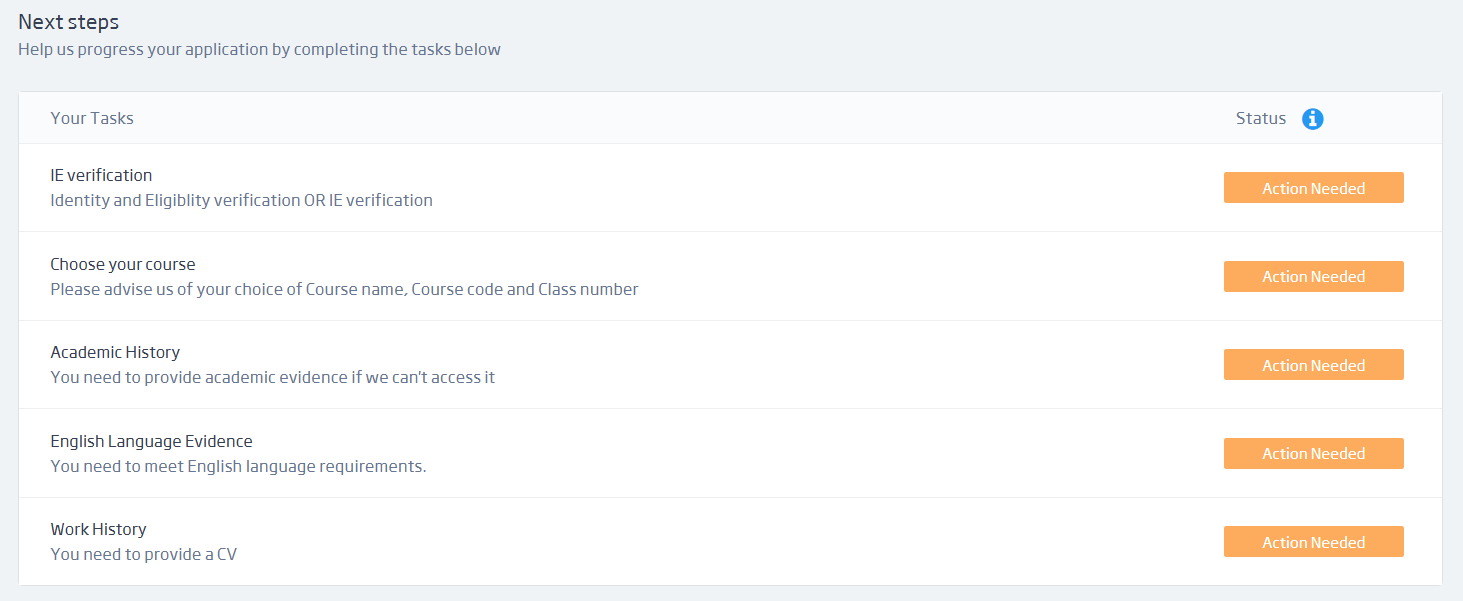
Your enrolment dashboard is where you need to complete tasks, do this by clicking on the Action Needed button beside each task. A sample of how this will look is shown in the picture below.
The application tasks you need to complete are:- Proof of your New Zealand or Australian citizenship or permanent residency.
- Academic history.
- Work history – upload your CV.
- Choose your course – advise us of your choice of course name, course code and class number.
For help with these tasks, see how to complete application tasks.
Payment
When your application has been processed, we will email you an invoice.
Payment needs to be made at least seven days before the course start date.
Need help
If you have questions or would like help, email application@unitec.ac.nz


